
A Calmer Way to Finish the Binder.
LocalTB brings trial balance work, supporting documents, and journal entries into one Windows desktop workspace—without moving the binder into a LocalTB-hosted cloud. Its optional AI Connector works with Claude for authorized, read-and-propose review and is included at launch.
Built for the Practical Accountant
Modern practice management tools and portals handle your client upload queues, billing, and task tracking beautifully. But when it comes time to actually organize the engagement—grouping accounts, importing tax codes, posting adjusting entries, and consolidating entities—practitioners are left with a frustrating choice: pay thousands of dollars a year for bloated cloud engagement suites, or resort to an unorganized mess of Excel sheets and File Explorer folders.
LocalTB was built to fill that exact gap. It provides a structured, professional engagement workbench to assemble and finalize your workpapers at a price that makes sense for independent firms. You keep using your preferred client portal; LocalTB handles the actual engagement execution.
Core Tools for Tax and Accounting Engagements
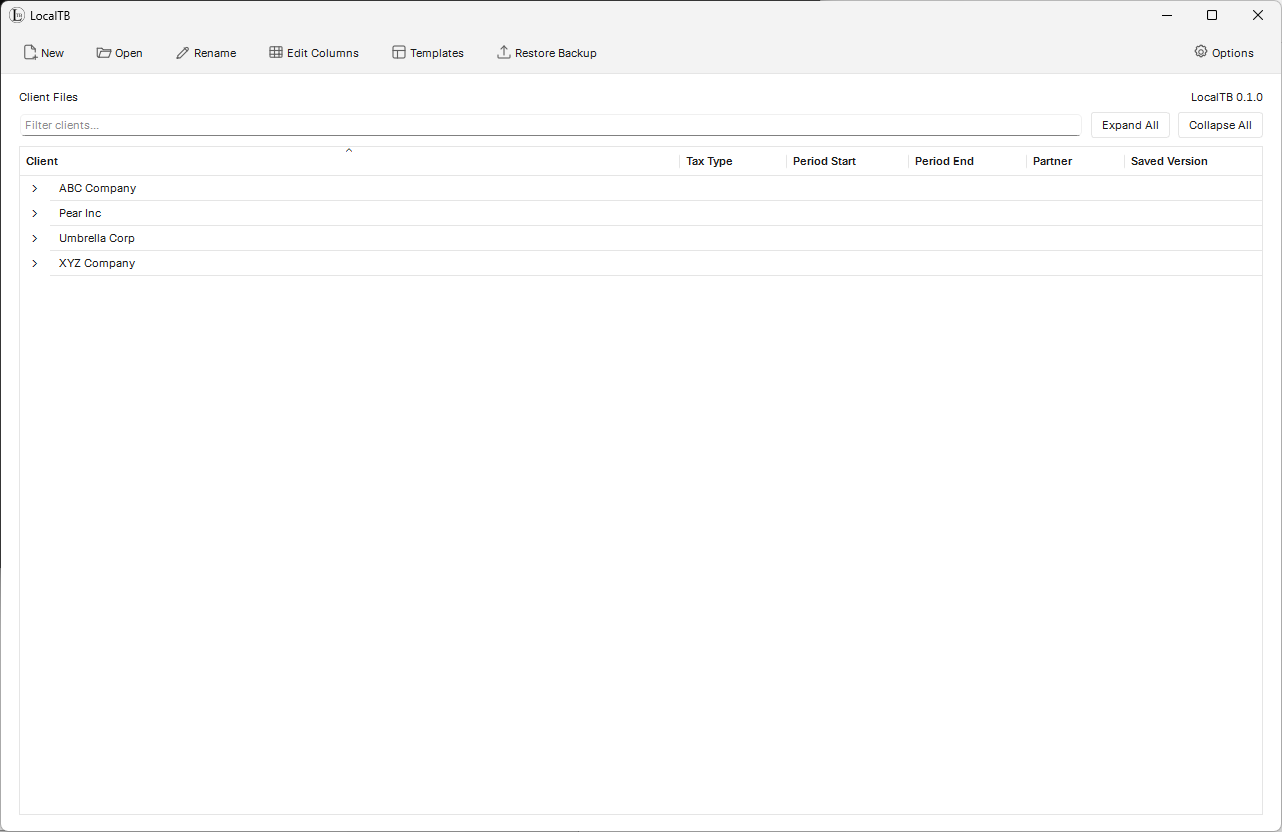
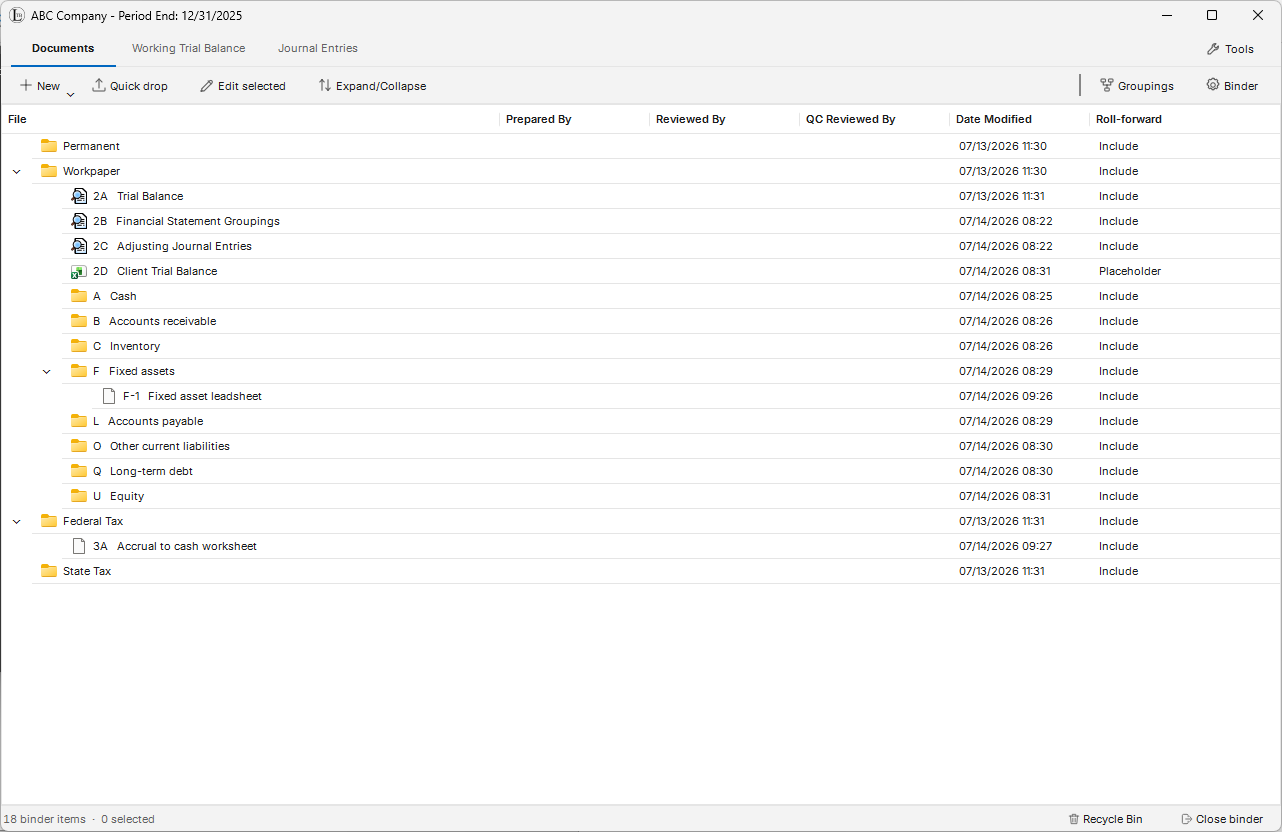
Each client engagement is treated as a single, self-contained binder file. It neatly indexes your trial balance, adjustments, source documents, and the final report files you add without splitting the engagement across disjointed folders.
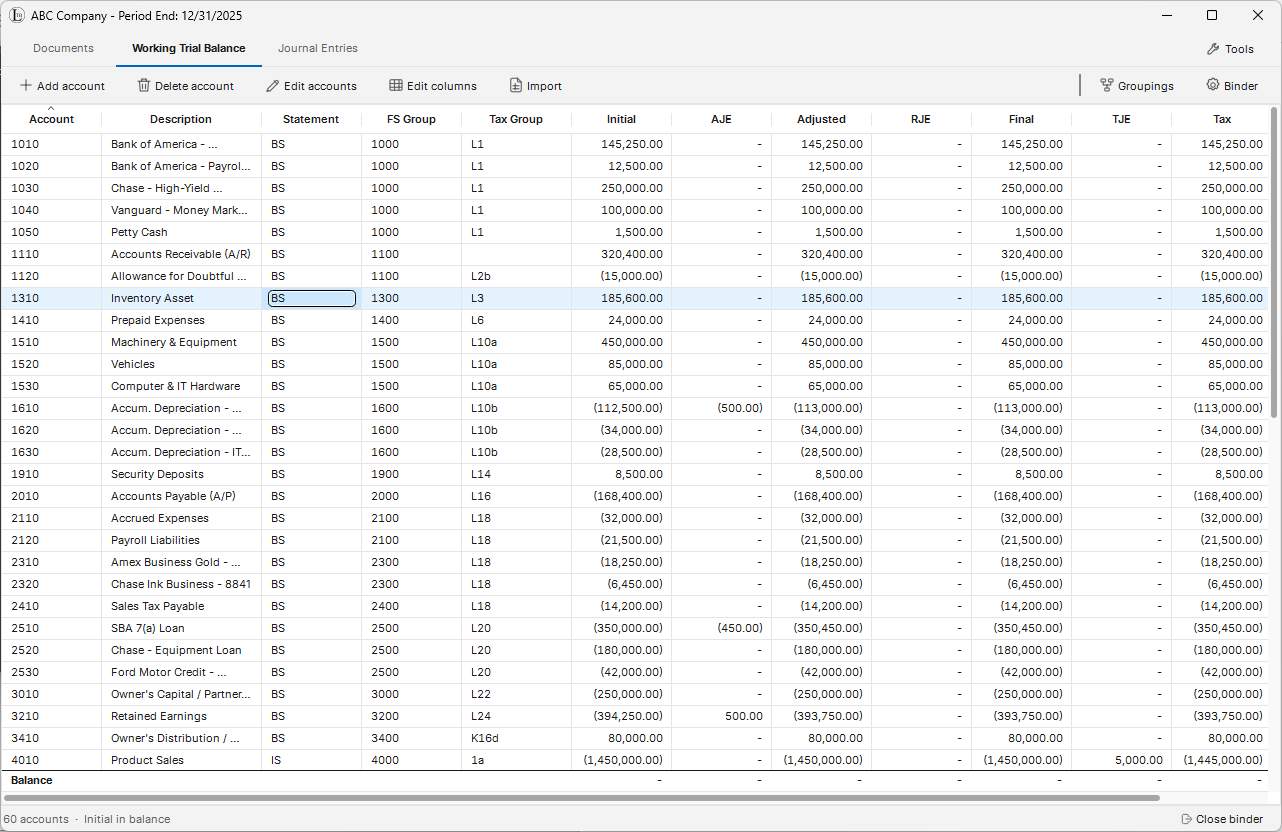
Trial Balance Workspace
Import your client’s unadjusted numbers and map account structures with an intuitive column wizard designed for tax and financial statement workflows.
Indexed Document Manager
File source documents, support schedules, and final reports directly within the engagement binder with references, signoffs, and an organized history.
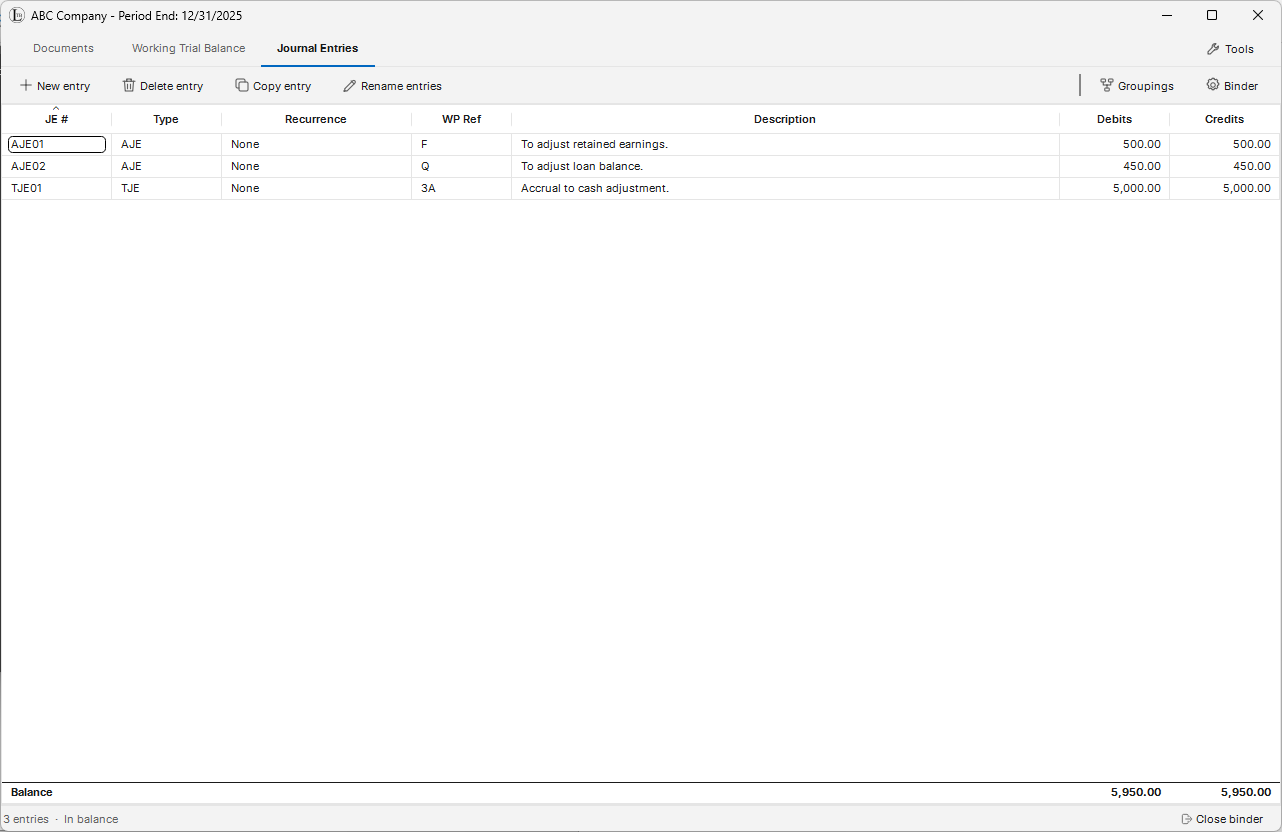
Adjusting & Tax Journal Entries
Post reclassifying, adjusting, and federal tax journal entries with clear, automatic balancing tracking.
Financial Reporting
Generate clean, printable trial balances, lead schedules, and journal entry working reports for review and engagement support.
Automatic Year-End Rollforwards
Create the next period’s binder while carrying forward supported account structures, groupings, tax mappings, and selected workpaper content.
Simple Entity Consolidation
Combine matching-period financials for simple domestic, wholly owned entities in one workspace with elimination and consolidation entries.
Excel Links
Build reusable roll-forward schedules, leadsheets, and financial-statement workbooks with LocalTB formulas that update when you refresh the workbook data.
Word Links
Place linked balances, names, dates, and other binder values into financial statements and report templates while preserving Word formatting.
Choose Where Your Binder Lives
LocalTB installs as a Windows desktop application and does not require client binder data to be uploaded to a LocalTB-hosted cloud. Your firm selects each binder’s location—local storage, removable media, a synchronized folder, or network storage—and remains in control of its backup and access policies.
This local-first model can support your firm’s written information security plan, but it does not replace the safeguards, encryption, access controls, monitoring, training, and backup practices required by your own policies and applicable rules.
LocalTB Is Built to Work with Claude
LocalTB works with Claude through an optional, default-off AI Connector built on MCP and included at launch. The connector lets Claude review an approved, read-only view of binder information. The view is fixed when you authorize it, so Claude works from the information you chose to approve rather than from direct access to your live binder.
The connector supports read-and-propose work: Claude can return findings and proposed next steps, while LocalTB remains the system of record. It cannot open your binder database or file system, post entries, renumber accounts, or make direct changes. Every change remains subject to LocalTB’s native review and controls.
Claude is a separate service. When you use the optional connector, you connect it with your own Claude account and any required subscription; LocalTB does not provide, resell, or manage Claude subscriptions. The connection is off by default and requires separate authorization for the device and each binder.
You choose the binder
You choose when to enable the connection. It is off by default and requires separate device and binder authorization.
Claude reviews an approved, read-only view
The approved binder information is provided as a read-only view fixed at the time you authorize it; Claude receives no direct database or file-system access.
LocalTB keeps the final say
AI output remains a proposal for human review. Any eventual binder change must pass through LocalTB’s own controls.
From Import to Organized Workpapers
A typical engagement moves through four distinct milestones inside a single binder file.
Import
Bring in an unadjusted trial balance from an Excel workbook exported by your accounting or tax system with a guided column-mapping wizard.
Adjust
Post adjusting, tax, or reclassifying journal entries and structure client account groupings.
Report
Compile lead schedules, review balancing positions, and print consistent working reports.
Roll Forward
Create the following period’s binder and carry forward supported account structures, groupings, mappings, and selected workpaper content.
Request a Trial by Email
Email us to request a LocalTB trial. We will reply with current availability, installation instructions, and the applicable evaluation terms.
There is no public checkout or automatic activation. Trial access is arranged directly so you can confirm that LocalTB fits your firm’s workflow and environment.
Request a Trial by EmailFrequently Asked Questions
How does LocalTB fit in with my existing software?
LocalTB handles the workpaper execution side of your practice. You continue using your existing client portal or practice management tool (like TaxDome, Canopy, or Karbon) to interact with clients, and use LocalTB on your desktop to balance books, map tax codes, and assemble the final engagement.
How can I evaluate LocalTB?
Request a trial by email. We will confirm availability and provide the installation instructions and applicable evaluation terms directly.
What operating systems are supported?
LocalTB is a Windows desktop application delivered through a per-user installer that does not require administrator privileges. If LocalTB is run within a managed hosted desktop, installation and operation require authorization from the hosting provider. LocalTB does not certify individual hosting providers; confirm the environment directly with your provider before beginning a trial.
Can LocalTB link trial balance data to Excel and Word?
Yes. At launch, LocalTB includes optional companions for supported Windows Office environments. Excel uses LocalTB formulas against read-only workbook data refreshed on command. Word places tagged values in the document and updates them only when you choose Refresh Links. Neither companion writes changes back to the binder.
Where can I store and back up binder files?
Each engagement is a standalone binder file saved in a user-selected local, removable, synchronized, or network location. Your firm controls the location’s suitability, access, synchronization, and backup policies.
Can LocalTB support my firm’s data security plan?
LocalTB does not require binder data to be stored in a LocalTB-hosted cloud, which can support a firm’s storage and access controls. Software architecture alone does not satisfy IRS Publication 4557 or the FTC Safeguards Rule; each firm remains responsible for its written security plan, encryption, access controls, backups, monitoring, training, and other required safeguards.
Can I use LocalTB with Claude?
Yes. LocalTB works with Claude through an optional, Claude-compatible AI Connector included at launch. The connection is off by default and requires separate authorization for the device and binder. Claude can review approved binder information and return proposals, but it cannot directly access or change the binder; LocalTB retains native review before any change.
Does LocalTB include a Claude subscription?
No. Claude is provided separately by Anthropic under its own terms. The optional connector works with your own Claude account and any required subscription. LocalTB does not sell, bundle, resell, administer, or bill for Claude.
How is trial access delivered?
Trial access is handled directly by email. We will provide current availability, installation instructions, and the applicable evaluation terms. There is no public checkout or automatic activation flow.
Need Support or Have Questions?
Have questions about trial access, deployment, hardware compatibility, or configuration within your network? Contact us directly.
Email contact@localtrialbalance.com